

DMARC reports are the closest thing you have to a security camera for your domain. They tell you exactly who is sending email as you, and whether mailbox providers trust it. The catch is that they arrive as dense XML files that look like nothing a marketer should have to read. Here is what is actually inside them, and how to turn that data into decisions.
What DMARC reports are, and why they exist
When you publish a DMARC record, you can ask the mailbox providers that receive your mail to send you reports about it. You do that with the rua= tag in your DNS record, which points to an email address where aggregate reports should be delivered. Once that tag is in place, providers like Google, Microsoft, and Yahoo start mailing you a regular summary of every message that claimed to come from your domain.
That visibility is the entire point. Without DMARC reporting, you have no idea who is sending under your name. Reports surface your own marketing platform and your help-desk tool, but also forgotten services and outright spoofers. You cannot safely tell receivers to reject mail that fails authentication until you can see everything that is currently sending, and reports are how you see it.
Two report types: aggregate and forensic
DMARC defines two kinds of report, and they serve very different purposes.
- Aggregate reports (RUA) are statistical summaries sent on a schedule, usually once a day. They contain no message content, just counts of how many messages came from each sending source and how they fared against SPF, DKIM, and your DMARC policy. These are the reports you will actually work from.
- Forensic, or failure, reports (RUF) are per-message and arrive close to real time when a message fails. They can include redacted headers and other detail about the individual email. In practice, very few providers send them today because of the privacy risk in forwarding parts of real messages, so most domains rely on aggregate reports alone.
For nearly every sender, aggregate reports are all you need to reach and maintain full DMARC enforcement. The rest of this article focuses on them.
What is inside an aggregate report
Every aggregate report follows the same structure defined in RFC 7489. Strip away the XML and it is really three things: who sent the report, what policy they saw, and what happened to your mail. The key pieces are:
- Reporting organization. The provider that generated the report, such as google.com, plus a report ID and the date range it covers (typically a 24-hour window).
- Your domain and policy. The DMARC record the provider found in your DNS at the time, including the policy you published (none, quarantine, or reject) and your alignment settings.
- One row per sending source. For each IP address that sent mail as your domain, the report lists the message volume, the SPF result, the DKIM result, the disposition the provider applied (delivered, quarantined, or rejected), and whether SPF and DKIM aligned.
That word alignment is the one to understand. SPF and DKIM can pass on a technicality without the result meaning anything to your recipients, so DMARC adds a second test. Alignment asks whether the domain that passed authentication matches the domain people actually see in the From field. DKIM aligns when the signing domain in the message matches your visible From domain. SPF aligns when the envelope sender domain matches it. A message only passes DMARC if at least one of SPF or DKIM both passes and aligns. This is why a report can show SPF passing yet DMARC failing: the check passed for some other domain, not yours.
How to actually read one
Open a raw aggregate report and you will see nested XML tags, IP addresses, and counts, with no labels a human would choose. A busy week can bring dozens of these files from different providers. Reading them by hand is slow, error-prone, and frankly miserable, which is exactly why so many teams publish a DMARC record and then never look at the reports.
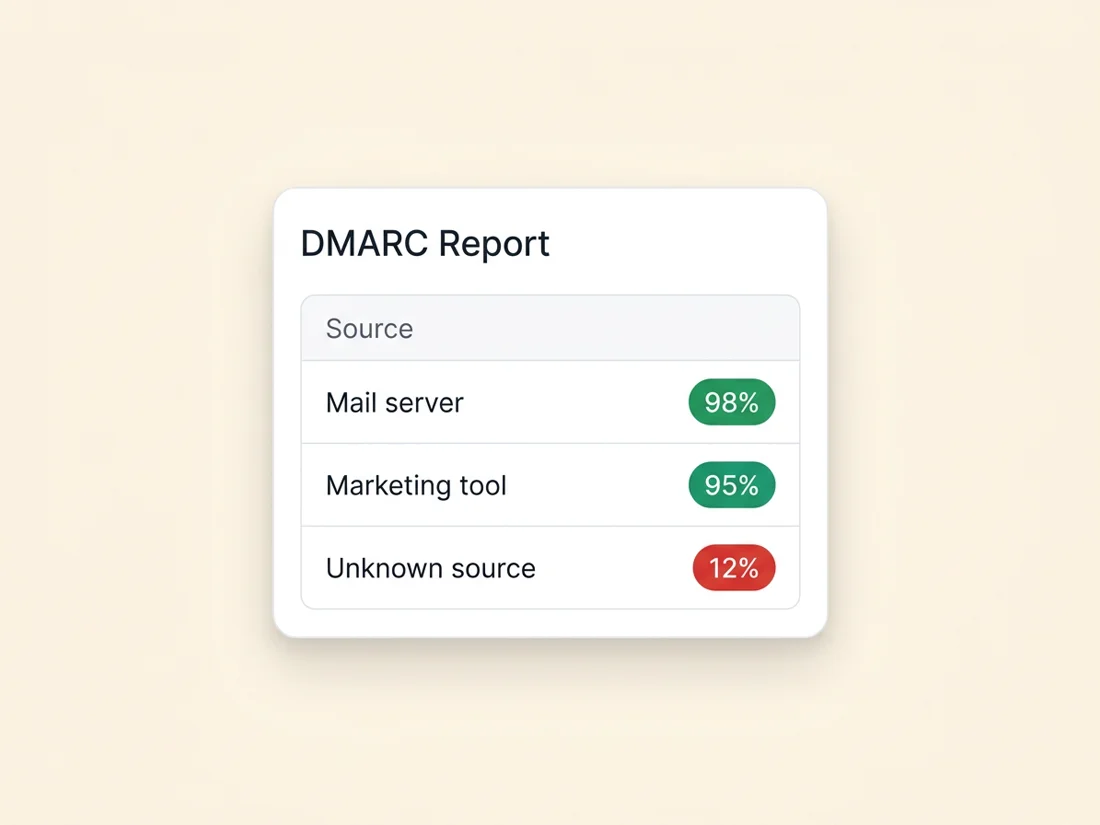
The practical answer is not to read the XML at all. A DMARC monitoring tool ingests the reports for you, groups the rows by sending source, resolves the IP addresses to recognizable names, and presents the result as plain-language summaries and charts. Instead of parsing tags, you see something like "247 messages from your marketing platform, all passing DMARC" next to "18 messages from an unknown host in another country, all failing." That is a report you can act on in seconds.
What reports commonly reveal
Once the data is readable, the same three patterns show up for almost every domain:
- Legitimate senders failing alignment. A real service of yours, such as an invoicing tool or a newsletter platform, is passing SPF or DKIM for its own domain but not aligning with yours. The fix is configuration: add the service to your SPF record, or set up DKIM signing with your domain so the result aligns.
- Forgotten and shadow-IT senders. A tool a former colleague signed up for, or a department's app you never knew about, quietly sending as your domain. Reports are often the first time anyone sees the full list.
- Spoofing attempts. Unfamiliar IP addresses sending mail that fails everything. This is the abuse DMARC exists to stop, and the report is your evidence that an enforcement policy is needed.
Sorting your real senders from the impostors is the whole job. Until you have done it, you cannot tell receivers to reject failing mail without risking your own messages. And when a single suspicious message needs investigating right now, the same verdicts live in that message's own Authentication-Results line; our guide on how to read email headers shows how to check one email the way reports summarize thousands.
Using the data to tighten your policy
Reports exist so you can move your DMARC policy from observation to protection safely. The recommended path is to start at p=none, which asks receivers to take no action and simply report. You stay there until your reports show that every legitimate source is authenticating and aligning.
From there you step up to p=quarantine (failing mail goes to spam) and eventually p=reject (failing mail is blocked outright). You can ease into each stage with the pct tag, applying the policy to a fraction of failing mail first and raising it as the reports stay clean. Google's own Workspace guidance recommends exactly this gradual rollout rather than jumping straight to enforcement.
- Stay at p=none until reports show your real senders passing.
- Fix any aligned-but-failing legitimate sources before tightening.
- Advance to quarantine, then reject, watching reports after each change.
- If legitimate mail starts failing, pause, fix the source, and resume.
Done patiently, this gets you to full enforcement without ever blocking your own mail. Enforcement also unlocks a visible reward: BIMI logo display and the Gmail blue checkmark both require a policy of quarantine or reject. New to the underlying records? Our complete guide to email authentication covers SPF, DKIM, and DMARC from the ground up.
How SpamCipher makes this painless
SpamCipher is the cold email platform for unlimited, automated sending, and DMARC monitoring is one instrument in the owned pipeline behind its 90%+ inbox placement. It is built for the marketer who never wants to open an XML file. You point your domain's rua= tag at SpamCipher, and from then on we ingest every aggregate report your providers send.
We parse those reports into plain language, group activity by sending source, and show you at a glance which senders are passing, which are failing alignment, and which look like spoofing. When something changes, such as a new source appearing or a trusted sender suddenly failing, we alert you so you can act before it dents your reputation. The result is the visibility DMARC was designed to give you, without the headache of reading the reports yourself.
Send at scale, and see who is sending as your domain
Turn your DMARC reports into plain-language insights and alerts, with no XML to read.
Get started free