

Your email service provider says your campaign was delivered. The number looks great, often above 98 percent. But delivered only means a mail server accepted the message. It says nothing about whether your email landed in the inbox or got buried in spam. Seed-based inbox placement testing closes that gap, and here is why it belongs in your routine.
Delivered is not the same as inboxed
Delivery rate and inbox placement rate sound interchangeable, but they measure two very different things. Delivery rate counts how many messages the receiving mail server accepted. A message still counts as delivered even when the provider quietly routes it to the spam folder. Inbox placement rate measures something your audience actually cares about: of the mail that was accepted, how much reached the primary inbox.
The space between those two numbers is where deliverability problems hide. You can have a 98 percent delivery rate and a 70 percent inbox placement rate at the same time. In that scenario, nearly a third of your accepted mail is sitting in spam or a buried tab, invisible to the people you wrote it for. Your reports look healthy while your results quietly suffer.
This is the core reason delivery rate alone misleads. It is a network-level signal, not a human one. To know whether your message reached a person, you have to look at where it actually came to rest.
What seed-based inbox placement testing is
A seed list is a set of test email accounts spread across the major mailbox providers: Gmail, Outlook, Yahoo, Apple Mail, and others. These accounts are owned and monitored by the testing service. To run a placement test, you send your campaign to the seed addresses alongside (or instead of) your real audience.
Once the mail arrives, the system checks each seed account to see which folder the message landed in, then reports the results back to you. Most platforms return placement within minutes of the send, so you get a fast, provider-by-provider picture of where your email goes. No guesswork, no waiting for complaints to roll in.
What a placement test reveals
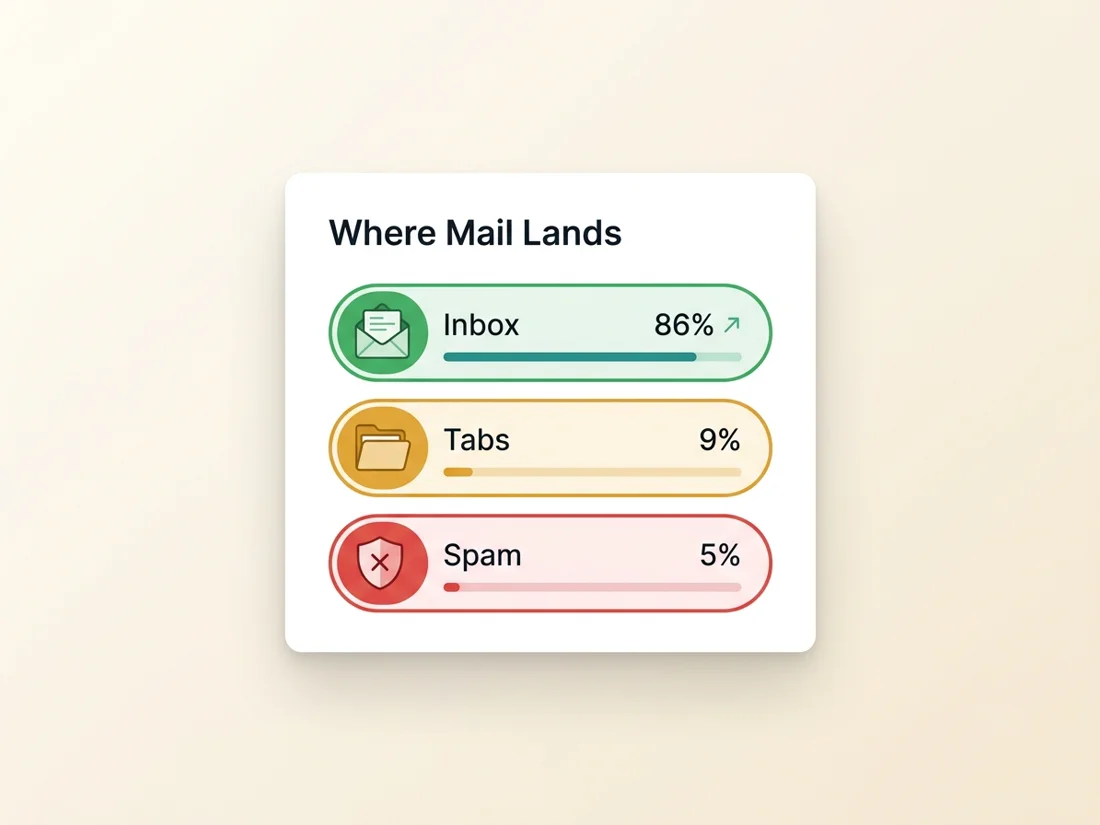
The headline answer is folder placement at each provider: inbox, spam, or missing entirely. That breakdown matters because deliverability is rarely uniform. Your mail might sail into Gmail and struggle at Outlook, or land perfectly today and slip into spam after a content change. A single blended number hides those differences. Per-provider results expose them.
Good tests go further than inbox-versus-spam. At Gmail, they show tab placement too, so you can see whether your message reached the primary inbox or got sorted into Promotions or Updates. For a marketer, that distinction often decides whether anyone opens the email. Many tests also surface the authentication results each provider saw (SPF, DKIM, and DMARC pass or fail), which turns a vague "we have a deliverability problem" into a specific, fixable cause. You can pull the same authentication verdicts from any single message by hand, and knowing how to read email headers is worth it for debugging, but headers only ever show you one mailbox's story; seeds show the pattern across providers.
- Folder placement per provider: inbox, spam, or missing.
- Gmail tab placement: Primary, Promotions, or Updates.
- Authentication as each provider sees it: SPF, DKIM, DMARC.
Seed lists, panels, and ISP data
Seed lists are not the only way to measure placement, and it helps to know how they compare. Panel data draws on real, consenting users and reports how mail behaves in their actual inboxes, which captures engagement that seed accounts cannot. The trade-off is that panels drift over time as participants drop off, and coverage for any single sender can be thin. ISP signals come straight from the providers themselves, through tools like Google Postmaster Tools and Microsoft SNDS. Those are authoritative for reputation and complaint rates, but they report on your domain in aggregate rather than telling you where a specific campaign landed.
Seed testing fills the gap those leave: a fast, repeatable, per-campaign look at placement across many providers at once. It pairs naturally with ISP data, which is why we treat the two as complements rather than rivals.
It would be dishonest to oversell seed lists, so here is the limitation plainly. Seed accounts are test mailboxes, not real engaged recipients. They do not open, click, or reply the way a genuine subscriber does, and modern providers weigh those engagement signals heavily when deciding placement. That means seed results are directional, not absolute. A clean seed test is a strong signal that your authentication, content, and infrastructure are in order, but it is not a guarantee that an unengaged or poorly targeted list will reach every real inbox. A few more cautions are worth keeping in mind:
- Small seed counts are noisy. One provider can swing the headline percentage, so read per-provider results, not just the average.
- Consumer and business mailboxes filter differently. Results from a personal Gmail do not automatically apply to Google Workspace, and the same holds for Outlook.com versus Microsoft 365.
- Match the seed mix to your audience. If most of your real contacts are on one provider, a seed list weighted toward another can mislead you.
That last point matters most for business senders: corporate audiences live overwhelmingly on Microsoft 365 behind security gateways, so a Gmail-only seed mix tests the minority of your list. The full picture of that filtering gauntlet is in our B2B email marketing guide.
When to run a placement test
You do not need to test every send, but a few moments deserve it. The most valuable time is before a major campaign, when the cost of landing in spam is highest. Testing a representative version of the message first lets you catch a problem while you can still fix it, rather than after it has gone to your whole list.
It is also worth testing right after any change that touches how providers judge you. That includes authentication updates (a new SPF record, a rotated DKIM key, a tightened DMARC policy), a switch in sending platform or IP, and shifts in template or content that might trip a spam filter. During a domain or IP warmup, periodic tests help you confirm that placement is improving as your reputation builds rather than quietly slipping.
- Before a major or high-stakes campaign.
- After authentication, platform, or reputation changes.
- Throughout a domain or IP warmup.
How to act on the results
A placement test is only useful if it changes what you do next. When results come back uneven, the provider that struggled usually points you at the cause. If authentication failed for a given mailbox, fix the underlying records first; our guide to email authentication walks through SPF, DKIM, and DMARC in plain language. If the message reached the inbox almost everywhere but tripped at one provider, look at content: heavy images, spammy phrasing, link-laden templates, and broken rendering are common triggers. If placement is poor across the board, the problem is usually reputation, which is built and protected over time through consistent sending and clean lists.
List hygiene quietly underpins all three. Unengaged and invalid addresses drag down reputation and raise complaint rates, which is exactly what pushes mail toward spam in the first place. Verifying your contacts and pruning the dead weight gives every other fix a better foundation.
SpamCipher is the cold email platform for unlimited, automated sending, and it brings these pieces together on the same owned pipeline it sends from. Run an inbox placement test to see where your mail lands across providers, check the authentication each provider saw, monitor your domain's reputation, and verify your list, all from one place. Test before you send, act on what you learn, and stop trusting a delivery number that was never measuring the inbox. Measured placement is also the foundation of the only promise worth making in this business; the full system behind it is laid out in how to own the inbox at 90%+ placement.
See where your mail actually lands
Run an inbox placement test across providers, then verify your list and monitor your domain, all from one place.
Get started free